ScottGu recommended a very useful tool,namely Patterns & Practices Guidance Explorer, which contains hundreds lists of security & performance best practices and patterns. The usage scenarios are
"1. Improve the security and performance of your application with guidelines and checklists that match your application exactly.
2. You can build custom sets of guidance and share with your team as recommended practice.
3. You can add new guidance to the library to share with your team, your company or the larger development community. "
Hope this helps...
Friday, September 29, 2006

Thursday, September 21, 2006
Free PDF Converter in .NET
I have been struggling looking for non-commercial PDF library to convert my ASP.NET pages to PDF for reporting purpose. Finally, I decided to choose iTextSharp v3.1.5 library among other free libraries. I have found out that the library is extremely handy with few cool features such as document watermarking and encryption, user permission on copying, printing the document and the list goes on.
Anyway, there is an annoying problem - the library has iTextSharp.text.Image class, which conflicts with the System.Drawing.Image class. Hence, the class will be ambiguous if both namespaces are imported in your project. Anyway, this matter is bearable for me. :)
Library Project Homepage : http://sourceforge.net/projects/itextsharp/
Library Download : http://prdownloads.sourceforge.net/itextsharp/itextsharp-3.1.5-dll.zip?download
Tutorial (C#) Download : http://prdownloads.sourceforge.net/itextsharp/iTextSharp.tutorial.01.zip?download
Tutorial (VB) Download : http://prdownloads.sourceforge.net/itextsharp/iTextSharp.tutorial.VB.NET.01.zip?download
Cool !
Anyway, there is an annoying problem - the library has iTextSharp.text.Image class, which conflicts with the System.Drawing.Image class. Hence, the class will be ambiguous if both namespaces are imported in your project. Anyway, this matter is bearable for me. :)
Library Project Homepage : http://sourceforge.net/projects/itextsharp/
Library Download : http://prdownloads.sourceforge.net/itextsharp/itextsharp-3.1.5-dll.zip?download
Tutorial (C#) Download : http://prdownloads.sourceforge.net/itextsharp/iTextSharp.tutorial.01.zip?download
Tutorial (VB) Download : http://prdownloads.sourceforge.net/itextsharp/iTextSharp.tutorial.VB.NET.01.zip?download
Cool !
Tuesday, September 19, 2006
No more DbCommandWrapper class
I'm testing the Enterprise Library January CTP 2006, and I have been searching for the DbCommandWrapper class and the GetXCommandWrapper() methods of Database class but they do not exist. Eventually, I found out that they are actually removed from the DAAB in this new version.
Example of code for old versions of DAAB prior to January 2006 release
Database db = DatabaseFactory.CreateDatabase();
DBCommandWrapper dbCommand = db.GetStoredProcCommandWrapper("SelectAuthors");
dbCommand.AddInParameter("AuthorID", DbType.String, strAuthorID);
DataSet dsAuthors = db.ExecuteDataSet(dbCommand);
Example of code for DAAB January CTP 2006
using System.Data.Common;
Database db = DatabaseFactory.CreateDatabase();
DbCommand dbCommand = db.GetStoredProcCommand("SelectAuthors");
db.AddInParameter(dbCommand,"AuthorID", DbType.String, strAuthorID);
DataSet dsAuthors = db.ExecuteDataSet(dbCommand);
Be informed that some online examples are using DbCommandWrapper class. thus, make some modification like above. Visit Intro to DAAB January 2006 for more version migration issues.
Example of code for old versions of DAAB prior to January 2006 release
Database db = DatabaseFactory.CreateDatabase();
DBCommandWrapper dbCommand = db.GetStoredProcCommandWrapper("SelectAuthors");
dbCommand.AddInParameter("AuthorID", DbType.String, strAuthorID);
DataSet dsAuthors = db.ExecuteDataSet(dbCommand);
Example of code for DAAB January CTP 2006
using System.Data.Common;
Database db = DatabaseFactory.CreateDatabase();
DbCommand dbCommand = db.GetStoredProcCommand("SelectAuthors");
db.AddInParameter(dbCommand,"AuthorID", DbType.String, strAuthorID);
DataSet dsAuthors = db.ExecuteDataSet(dbCommand);
Be informed that some online examples are using DbCommandWrapper class. thus, make some modification like above. Visit Intro to DAAB January 2006 for more version migration issues.
Monday, September 18, 2006
EBook on Threading in .NET
Thinking of learning Threading in .NET? I've found out a very handy ebook that explains fundamentals about .NET Threading. Worth to read !
Web : http://www.albahari.com/threading/
Book (PDF) : http://www.albahari.com/threading/threading.pdf
Sharing~~
Web : http://www.albahari.com/threading/
Book (PDF) : http://www.albahari.com/threading/threading.pdf
Sharing~~
Corrections of ClientCallBack Example
I have tested the example of ASP.NET 2.0 new feature - ClientCallBack at ASP.NET 2.0's Client Callback Feature, but found not working due to:
1. There is no this.GetCallbackEventReference()
2. RaiseCallbackEvent() does not return string data type, from ICallbackEventHandler
3. Missing of GetCallbackResult(), that defined in ICallbackEventHandler
Finally I get it done by making some corrections:
1. Use this.ClientScript.GetCallbackEventReference()
2. Define the RaiseCallbackEvent() that returns no data type
3. Define GetCallbackResult() to return the result to the client-side
Corrected code:
protected void Page_Load(object sender, EventArgs e)
{
sCallBackInvocation = this.ClientScript.GetCallbackEventReference(this, "message", "ShowServerTime", "context", "OnError",true);
}
public void RaiseCallbackEvent(string eventArgument)
{
sCallBackInvocation = DateTime.Now.ToString();
}
public string GetCallbackResult()
{
return sCallBackInvocation;
}
Recommendation
1. Check whether the browser does support callback feature in Page_Load() event
if (!Request.Browser.SupportsCallback)
// error message
1. There is no this.GetCallbackEventReference()
2. RaiseCallbackEvent() does not return string data type, from ICallbackEventHandler
3. Missing of GetCallbackResult(), that defined in ICallbackEventHandler
Finally I get it done by making some corrections:
1. Use this.ClientScript.GetCallbackEventReference()
2. Define the RaiseCallbackEvent() that returns no data type
3. Define GetCallbackResult() to return the result to the client-side
Corrected code:
protected void Page_Load(object sender, EventArgs e)
{
sCallBackInvocation = this.ClientScript.GetCallbackEventReference(this, "message", "ShowServerTime", "context", "OnError",true);
}
public void RaiseCallbackEvent(string eventArgument)
{
sCallBackInvocation = DateTime.Now.ToString();
}
public string GetCallbackResult()
{
return sCallBackInvocation;
}
Recommendation
1. Check whether the browser does support callback feature in Page_Load() event
if (!Request.Browser.SupportsCallback)
// error message
Page Redirect After Login in Forms Authentication
Normally, we will be redirected to the originally requesting page, with ReturnUrl query string appended in the URL after successful user login in Form Authentication using FormsAuthentication.RedirectFromLoginPage() method. Otherwise, the we will be redirected to default.aspx, by default.
The question is, what method do we need to use if we want to redirect the users to different page other than default.aspx? Here I demonstrate how it can be accomplished.
bool isAuthenticated = true;
if(isAuthenticated) // after user is authenticated
{
if(Request.Params["ReturnUrl"] != null)
{
FormsAuthentication.RedirectFromLoginPage(txtUsername.Text, false);
}
else
{
FormsAuthentication.SetAuthcookie(txtUsername.Text, false);
Response.Redirect("yourpage.aspx");
}
}
Get rid of default ones.... !
The question is, what method do we need to use if we want to redirect the users to different page other than default.aspx? Here I demonstrate how it can be accomplished.
bool isAuthenticated = true;
if(isAuthenticated) // after user is authenticated
{
if(Request.Params["ReturnUrl"] != null)
{
FormsAuthentication.RedirectFromLoginPage(txtUsername.Text, false);
}
else
{
FormsAuthentication.SetAuthcookie(txtUsername.Text, false);
Response.Redirect("yourpage.aspx");
}
}
Get rid of default ones.... !
Sunday, September 17, 2006
VIEWing your controls STATE
ViewState is one of the state managements in the ASP.NET and it is paramount especially in custom server control development. Proper understanding and use of ViewState could definitely save your life, notably in postback model in ASP.NET.
Here I recommend some articles of ViewState for your readings :
1. Understanding ASP.NET ViewState [MSDN]
2. TRULY Understanding ViewState [InfiniteLoop's Blog]
3. Understanding View State in ASP.NET [aspAlliance]
4. ViewState: All You Wanted to Know
5. The ASP.NET ViewState [MSDN Magazine]
You already mastered another ASP.NET 's state management ;)
Here I recommend some articles of ViewState for your readings :
1. Understanding ASP.NET ViewState [MSDN]
2. TRULY Understanding ViewState [InfiniteLoop's Blog]
3. Understanding View State in ASP.NET [aspAlliance]
4. ViewState: All You Wanted to Know
5. The ASP.NET ViewState [MSDN Magazine]
You already mastered another ASP.NET 's state management ;)
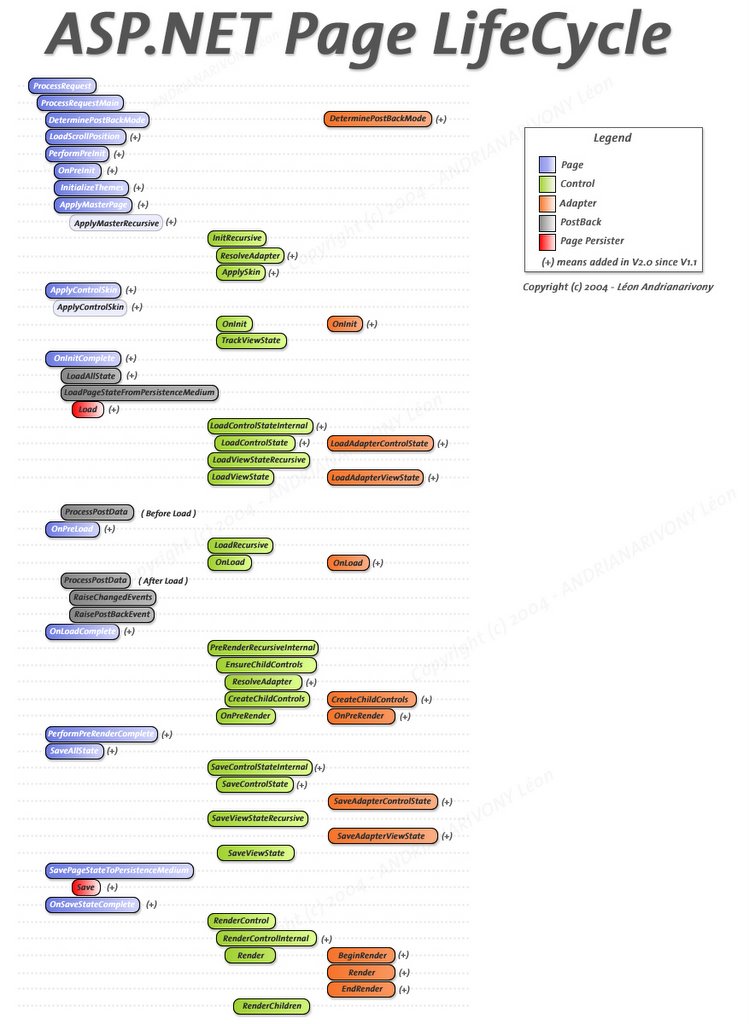
ASP.NET 2.0 Full Page Life Cycle Diagram
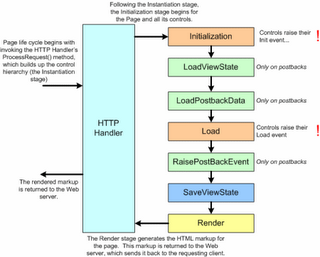
Here is the big yet comprehensive diagram illustrating the page life cycle in ASP.NET 2.0
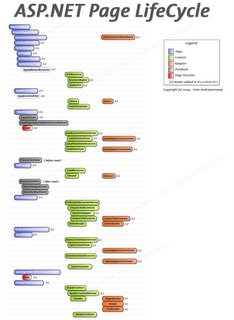
To recall the Page Life Cycle in ASP.NET v1.x
ASP.NET 2.0 ones much complex !
To recall the Page Life Cycle in ASP.NET v1.x

ASP.NET 2.0 ones much complex !
Checking Existence of Available SQL Server
Of late, I had read an article about determining list of SQL Servers that are available to your application.
.NET 1.1
There is no way but you need to use COM-based SQLDMO to have an interop call.
using SQLDMO;
try
{
NameList objSQLList;
ApplicationClass objSQLApp = new SQLDMO.ApplicationClass();
objSQLList = objSQLApp.ListAvailableSQLServers();
foreach(string name in objSQLList)
Response.Write(name + "
");
}
catch(Exception ex)
{
}
finally
{
objSQLApp.Quit();
}
* You have to reference the SQLDMO.dll, which located at:\Program Files\Microsoft SQL Server\\Tools\Binn by default.
.NET 2.0
It is much easier. You can retrieve the list of servers available using System.Data.Sql namespace, by enumerating each of the server instance.
SqlDataSourceEnumerator enumerator = SqlDataSourceEnumerator.Instance;
DataTable datatable1 = enumerator.GetDataSources();
foreach (DataRow row in datatable1.Rows)
{
Response.Write("Server Name:" + row["ServerName"] + "
");
Response.Write("Instance Name:" + row["InstanceName"] + "
");
}
Sometimes, these methods are better trying to connect the DB Server to see whether it is succesfully connected, but the output not always accurate due to :
1. Invalid Login / User credentials
2. Timeout due to network congestions
Neat !
.NET 1.1
There is no way but you need to use COM-based SQLDMO to have an interop call.
using SQLDMO;
try
{
NameList objSQLList;
ApplicationClass objSQLApp = new SQLDMO.ApplicationClass();
objSQLList = objSQLApp.ListAvailableSQLServers();
foreach(string name in objSQLList)
Response.Write(name + "
");
}
catch(Exception ex)
{
}
finally
{
objSQLApp.Quit();
}
* You have to reference the SQLDMO.dll, which located at
.NET 2.0
It is much easier. You can retrieve the list of servers available using System.Data.Sql namespace, by enumerating each of the server instance.
SqlDataSourceEnumerator enumerator = SqlDataSourceEnumerator.Instance;
DataTable datatable1 = enumerator.GetDataSources();
foreach (DataRow row in datatable1.Rows)
{
Response.Write("Server Name:" + row["ServerName"] + "
");
Response.Write("Instance Name:" + row["InstanceName"] + "
");
}
Sometimes, these methods are better trying to connect the DB Server to see whether it is succesfully connected, but the output not always accurate due to :
1. Invalid Login / User credentials
2. Timeout due to network congestions
Neat !
Tuesday, September 12, 2006
Storing Static JavaScript in Resource File [ASP.NET 2.0]
In ASP.NET , we normally embedded the script string in the code-behind and invoke the RegisterStartupScript() to emit the JavaScript. The normal way we do like
ClientScriptManager csManager = Page.ClientScript;
StringBuilder strScript = new StringBuilder();
strScript.AppendLine("<script>");
strScript.AppendLine(@"var response = confirm('{0}, do you want to continue ?');","Alvin Chooi");
strScript.AppendLine("if(response)");
strScript.AppendLine(" alert('OK')");
strScript.Append("</script>");
if (!csManager.IsStartupScriptRegistered("ScriptTest"))
csManager.RegisterStartupScript(this.GetType(), "ScriptTest", strScript.ToString());
The script is less readable and messy. What the worst is that would be a slightly string manipulation overhead. In ASP.NET 2.0, you can store this static script in the resource file resx, which is stored in the App_GlobalResources folder.
Screenshot
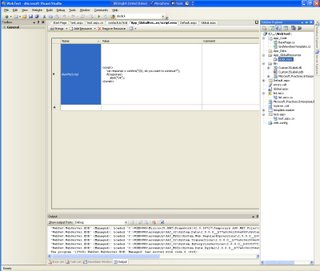
You could able to reference the script string from the resource file without hard-coding the script in the code-behind by
ClientScriptManager csManager = Page.ClientScript;
if (!csManager.IsStartupScriptRegistered("ScriptTest"))
{
csManager.RegisterStartupScript(this.GetType(), "ScriptTest", String.Format(Resources.script.AlertMeScript,"Alvin Chooi"));
}
Neat and manageable !
ClientScriptManager csManager = Page.ClientScript;
StringBuilder strScript = new StringBuilder();
strScript.AppendLine("<script>");
strScript.AppendLine(@"var response = confirm('{0}, do you want to continue ?');","Alvin Chooi");
strScript.AppendLine("if(response)");
strScript.AppendLine(" alert('OK')");
strScript.Append("</script>");
if (!csManager.IsStartupScriptRegistered("ScriptTest"))
csManager.RegisterStartupScript(this.GetType(), "ScriptTest", strScript.ToString());
The script is less readable and messy. What the worst is that would be a slightly string manipulation overhead. In ASP.NET 2.0, you can store this static script in the resource file resx, which is stored in the App_GlobalResources folder.
Screenshot
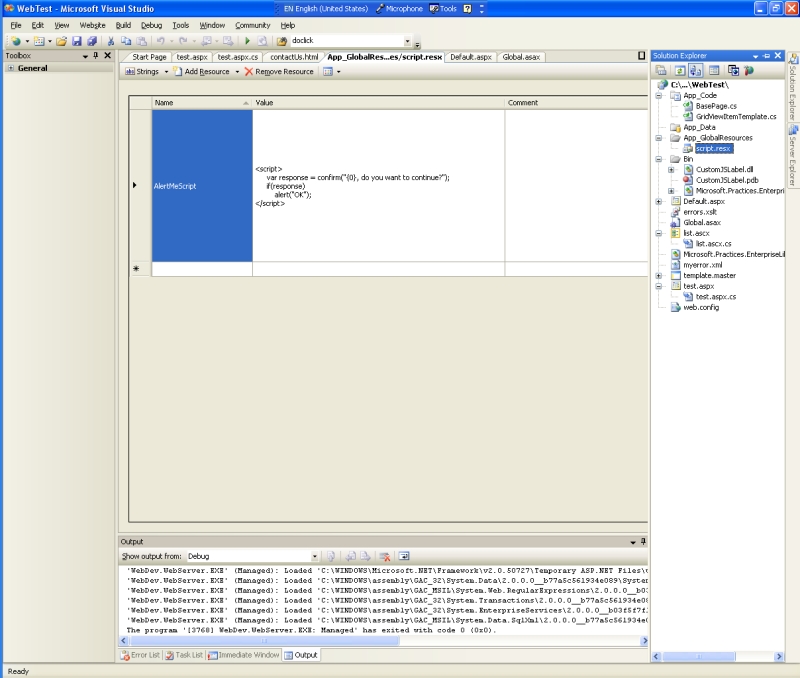
You could able to reference the script string from the resource file without hard-coding the script in the code-behind by
ClientScriptManager csManager = Page.ClientScript;
if (!csManager.IsStartupScriptRegistered("ScriptTest"))
{
csManager.RegisterStartupScript(this.GetType(), "ScriptTest", String.Format(Resources.script.AlertMeScript,"Alvin Chooi"));
}
Neat and manageable !
Microsoft Interview Questions
Recently, I'd read the post of Jason Looney about questions asked Microsoft Interview. Amazing and extraordinary !
Worth to read
1. Microsoft Interview Questions Guide
2. ASP.NET Interview Questions (The only one I could answer well ;p)
3. .NET Interview Questions
4. The Guerrilla Guide to Interviewing
Hunting for more....
Worth to read
1. Microsoft Interview Questions Guide
2. ASP.NET Interview Questions (The only one I could answer well ;p)
3. .NET Interview Questions
4. The Guerrilla Guide to Interviewing
Hunting for more....
Friday, September 08, 2006
Fastest Ever Browser ?
Recently, I had read an article of What is the world's fastest browser, and it claimed that optimized firefox (swiftfox) is the fastest browser among others in 64-bit environment. Whereas, Konqueror is crowned best-performance browser in Linux.
Thursday, September 07, 2006
Accessing Text in DataGrid's TemplateField
If you try to access the content of TemplateField
<asp:TemplateColumn>
<ItemTemplate>
<%# DataBinder.Eval(Container.DataItem,"au_fname") %>
<%# DataBinder.Eval(Container.DataItem,"au_lname") %>
</ItemTemplate>
</asp:TemplateColumn>
using DataGrid1.Items[0].Cells[0].Text (I assume it is first column), you would probably get nothing. It is because the text would be placed in a special literal control called DataBoundLiteralControl, which is auto-generated by the compiler IF you place the data-bound expression in the ItemTemplate. Therefore, to access its content. You can use this,
((DataBoundLiteralControl)dgrdAuthors.Items[0].Cells[0].Controls[0]).Text
You get it !!!
<asp:TemplateColumn>
<ItemTemplate>
<%# DataBinder.Eval(Container.DataItem,"au_fname") %>
<%# DataBinder.Eval(Container.DataItem,"au_lname") %>
</ItemTemplate>
</asp:TemplateColumn>
using DataGrid1.Items[0].Cells[0].Text (I assume it is first column), you would probably get nothing. It is because the text would be placed in a special literal control called DataBoundLiteralControl, which is auto-generated by the compiler IF you place the data-bound expression in the ItemTemplate. Therefore, to access its content. You can use this,
((DataBoundLiteralControl)dgrdAuthors.Items[0].Cells[0].Controls[0]).Text
You get it !!!
Capitalizing Every First Letter of Words
How would you do that in your first thought? Would you create your own user-defined function for that purpose in .NET? Please do not reinvent the wheel because there is built-in method available.
using System.Globalization;
string str = "cool strINg";
string str1 = "COOL STRING";
TextInfo objTextInfo = new CultureInfo("en-US",false).TextInfo();
str = objTextInfo.ToTitleCase(str); // Cool String *CORRECT
str1 = objTextInfo.ToTitleCase(str1); // COOL STRING *WRONG
str1 = objTextInfo.ToTitleCase(str1.toLower()); // Cool String *CORRECT
* For FULL CAPITALIZED words, you need to convert them to lower case before passing it to the ToTitleCase() method.
using System.Globalization;
string str = "cool strINg";
string str1 = "COOL STRING";
TextInfo objTextInfo = new CultureInfo("en-US",false).TextInfo();
str = objTextInfo.ToTitleCase(str); // Cool String *CORRECT
str1 = objTextInfo.ToTitleCase(str1); // COOL STRING *WRONG
str1 = objTextInfo.ToTitleCase(str1.toLower()); // Cool String *CORRECT
* For FULL CAPITALIZED words, you need to convert them to lower case before passing it to the ToTitleCase() method.
Dynamically Adding Columns to GridView
I was asked in ASP.NET Forum why the dynamically inserted BoundField would be lost from the GridView's column collection on postback (eg. Button click in GridView)?
Many people would dynamically create controls in the Page_Load event. But I afraid it isn't a right place for the dynamic creation because the data in the control may not be pertained. (ViewState lost on postback). If possible, do the dynamic control creation in Initialization event (eg. Page_Init).
One of the differences between Page_Init and Page_Load is Page_Init event is only fired once and it is not fired on each postback, whereas the Page_Load event is always fired on every postback.
Back to the topic, hence, to avoid the dynamic GridView's fields gone from its GridView's collection on postback, you SHOULD always create it in GridView's Init event. For instance,
The related discussion can be found here
Good luck !
Many people would dynamically create controls in the Page_Load event. But I afraid it isn't a right place for the dynamic creation because the data in the control may not be pertained. (ViewState lost on postback). If possible, do the dynamic control creation in Initialization event (eg. Page_Init).
One of the differences between Page_Init and Page_Load is Page_Init event is only fired once and it is not fired on each postback, whereas the Page_Load event is always fired on every postback.
Back to the topic, hence, to avoid the dynamic GridView's fields gone from its GridView's collection on postback, you SHOULD always create it in GridView's Init event. For instance,
Protected Sub GridView_Init(sender as Object, e as EventArgs) Handles myGridView.Init
Dim field As New BoundField()
field.DataField = "data"
myGridView.Columns.Insert(0, field) 'To be first column in GridView
End Sub
Dim field As New BoundField()
field.DataField = "data"
myGridView.Columns.Insert(0, field) 'To be first column in GridView
End Sub
The related discussion can be found here
Good luck !
Recovering DB with LDF only
Of late, I witnessed the loss of mdf (due to corrupted or accidentally removed/overwritten) is painful. It is easy to recover the data from the .bak (database backup) or mdf(database file), but how would it be done the same thing just using ldf (log file) ? Here are the 10 steps that needs to be followed in order you have data restored.
1. Find out your previous database .bak file (backup file).
2. Backup your updated .MDF file and the latest LDF file
3. Delete your current database
- If you cant access to SQL Queries Analyzer no worries just open with master
- type :
p/s - Make sure your infected MDF and LDF fully deleted from C:\Program Files\Microsoft SQL Server\MSSQL\Data
4. Create a new database with FULL Mode
- Open SQL Analyzer type following codes:
- type :
5. Delete existing data and log files
- type :
- Make sure no more .MDF and .LDF in your C:\Program Files\Microsoft SQL Server\MSSQL\Data
6. Stop your whole database
7. Copy your previous infected .MDF and .LDF to C:\Program Files\Microsoft SQL Server\MSSQL\Data
8. Backup the log with NO_TRUNCATE
- Note that backup will error due to inaccessible data file, but log will still be backed up.
- type :
- Make sure backup success, check the .bak file if the file size too small if compare with your .LDF file size then might be error, maybe your infected .LDF file stored wrongly, but normally no problem.
- This is very important file, no error here then fine already.
9. Restore your database
- Restore your previous backup database. Doesn't matter if your data not up to date.
- type :
- p/s Remember use WITH NORECOVERY
10. Restore your backup log
- type:
- p/s Remember use WITH RECOVERY
- Check your data again.
- Done !!!
1. Find out your previous database .bak file (backup file).
2. Backup your updated .MDF file and the latest LDF file
3. Delete your current database
- If you cant access to SQL Queries Analyzer no worries just open with master
- type :
DROP DATABASE SAMPLE_DB
GO
GO
p/s - Make sure your infected MDF and LDF fully deleted from C:\Program Files\Microsoft SQL Server\MSSQL\Data
4. Create a new database with FULL Mode
- Open SQL Analyzer type following codes:
- type :
USE master
GO
CREATE DATABASE myDB
ON(NAME='myDB',
FILENAME='C:\Program Files\Microsoft SQL Server\MSSQL\Data\myDB..mdf')
LOG ON(NAME='myDB',
FILENAME='C:\Program Files\Microsoft SQL Server\MSSQL\Data\myDB_Log')
GO
ALTER DATABASE myDB
SET RECOVERY FULL
GO
EXEC sp_dboption 'myDB', 'autoclose', true
GO
GO
CREATE DATABASE myDB
ON(NAME='myDB',
FILENAME='C:\Program Files\Microsoft SQL Server\MSSQL\Data\myDB..mdf')
LOG ON(NAME='myDB',
FILENAME='C:\Program Files\Microsoft SQL Server\MSSQL\Data\myDB_Log')
GO
ALTER DATABASE myDB
SET RECOVERY FULL
GO
EXEC sp_dboption 'myDB', 'autoclose', true
GO
5. Delete existing data and log files
- type :
EXEC master..xp_cmdshell 'del C:\Program Files\Microsoft SQL Server\MSSQL\Data\myDB.mdf
EXEC master..xp_cmdshell 'del C:\Program Files\Microsoft SQL Server\MSSQL\Data\myDB_Log'
GO
EXEC master..xp_cmdshell 'del C:\Program Files\Microsoft SQL Server\MSSQL\Data\myDB_Log'
GO
- Make sure no more .MDF and .LDF in your C:\Program Files\Microsoft SQL Server\MSSQL\Data
6. Stop your whole database
7. Copy your previous infected .MDF and .LDF to C:\Program Files\Microsoft SQL Server\MSSQL\Data
8. Backup the log with NO_TRUNCATE
- Note that backup will error due to inaccessible data file, but log will still be backed up.
- type :
BACKUP LOG myDB
TO DISK='C:\Backups\myDB.bak'
WITH NO_TRUNCATE, INIT
GO
TO DISK='C:\Backups\myDB.bak'
WITH NO_TRUNCATE, INIT
GO
- Make sure backup success, check the .bak file if the file size too small if compare with your .LDF file size then might be error, maybe your infected .LDF file stored wrongly, but normally no problem.
- This is very important file, no error here then fine already.
9. Restore your database
- Restore your previous backup database. Doesn't matter if your data not up to date.
- type :
USE Master
RESTORE DATABASE DatabaseName
FROM DISK = 'c:\Backups\old_myDB.BAK
WITH NORECOVERY
RESTORE DATABASE DatabaseName
FROM DISK = 'c:\Backups\old_myDB.BAK
WITH NORECOVERY
- p/s Remember use WITH NORECOVERY
10. Restore your backup log
- type:
RESTORE LOG myDB
FROM DISK = 'C:\Backups\myDB.bak'
WITH RECOVERY
FROM DISK = 'C:\Backups\myDB.bak'
WITH RECOVERY
- p/s Remember use WITH RECOVERY
- Check your data again.
- Done !!!
JSON Reader
Today is a boring day, I decided to create a lightweight JSON reader for JSON manipulation using JavaScript (After I have not been touching JSON and JavaScript prototype since my FYP). My intention of creating this JSONReader is simply to manipulate/read the JSON value with string path supplied. To start off, I use a very simple JSON in my example.
Now, we "instantiate" the object of JSONReader with the JSON format passed as parameter to its constructor.
var reader = new JSONReader(myJSON);
Then at the frontend, we allow the users to key in the string path in the TextBox.
<input type="text" id="txtPath" name="textfield">
<input type="button" onclick="GetValue()" name="Submit" value="Get the Value">
<span id="lblMessage"/>
The string path provided by user will be passed to the FindValueByKeyPath() method of JSONReader in the GetValue() function to obtain the value in JSON. The $F() is the method in the prototype.js that used to retrieve the value of specified HTML element.
var path = $F("txtPath");
lblMessage.innerHTML = reader.findValueByKeyPath(path);
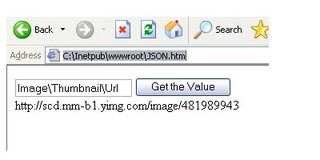
Test Results
User Input : Image\Thumbnail
Output : {"Url":"http://scd.mm-b1.yimg.com/image/481989943","Height":125,"Width":"100"}
User Input : Image\Thumbnail\Url
Output : http://scd.mm-b1.yimg.com/image/481989943
Screenshot
Additional Libraries Needed
prototype.js
$F(), class.Create()
json.js
parseJSON(), toJSONString()
The complete example can be downloaded here
Still boring ~~ :|
var myJSON = {"Image": {
"Width":800,
"Width":200,
"Height":600,
"Title":"View from 15th Floor",
"Thumbnail":
{
"Url":"http:\/\/scd.mm-b1.yimg.com\/image\/481989943",
"Height": 125,
"Width": "100"
},
"IDs":[ 116, 943, 234, 38793 ]
}}
"Width":800,
"Width":200,
"Height":600,
"Title":"View from 15th Floor",
"Thumbnail":
{
"Url":"http:\/\/scd.mm-b1.yimg.com\/image\/481989943",
"Height": 125,
"Width": "100"
},
"IDs":[ 116, 943, 234, 38793 ]
}}
Now, we "instantiate" the object of JSONReader with the JSON format passed as parameter to its constructor.
var reader = new JSONReader(myJSON);
Then at the frontend, we allow the users to key in the string path in the TextBox.
<input type="text" id="txtPath" name="textfield">
<input type="button" onclick="GetValue()" name="Submit" value="Get the Value">
<span id="lblMessage"/>
The string path provided by user will be passed to the FindValueByKeyPath() method of JSONReader in the GetValue() function to obtain the value in JSON. The $F() is the method in the prototype.js that used to retrieve the value of specified HTML element.
var path = $F("txtPath");
lblMessage.innerHTML = reader.findValueByKeyPath(path);
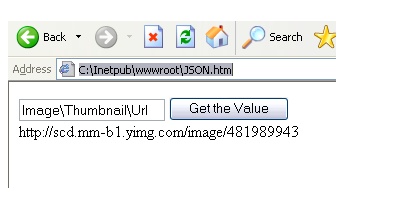
Test Results
User Input : Image\Thumbnail
Output : {"Url":"http://scd.mm-b1.yimg.com/image/481989943","Height":125,"Width":"100"}
User Input : Image\Thumbnail\Url
Output : http://scd.mm-b1.yimg.com/image/481989943
Screenshot
Additional Libraries Needed
prototype.js
$F(), class.Create()
json.js
parseJSON(), toJSONString()
The complete example can be downloaded here
Still boring ~~ :|
Saturday, September 02, 2006
ASP.NET Best Practices
I have been collecting ASP.NET BEST PRACTICES articles for quite some time. Here are some articles/guidelines that may be handy to you.
ASP.NET Performance Best Practices
1. Improving ASP.NET Performance [MSDN]
2. Developing High-Performance ASP.NET Application [MSDN2]
3. Performance Tips and Tricks for .NET Applications [MSDN]
4. 10 Tips for Writing High-Performance Web Applications [MSDN Magazine]
5. Improving String Handling Performance in .NET Framework Applications [MSDN]
6. Performance Strategies for Enterprise Web Site Development [Code Project]
7. Improving SQL Server Performance [MSDN]
8. Developing High-Performance ASP.NET Applications [aspalliance]
ASP.NET Security Best Practices
1. Building Secure ASP.NET Applications: Authentication, Authorization, and Secure Communication [MSDN]
2. Improving Web Application Security: Threats and Countermeasures [MSDN]
3. ASP.NET Security: 8 Ways to Avoid Attack [devx]
4. SQL Injection Attacks - Are You Safe? [sitepoint.com]
5. Security Practices: ASP.NET 2.0 Security Practices at a Glance [MSDN]
6. An Introductory Guide to Building and Deploying More Secure Sites with ASP.NET and IIS [MSDN Magazine]
ADO.NET Best Practices
1. Best Practices for Using ADO.NET [MSDN]
2. ADO.NET Best Practices [devx]
3. ADO.NET Best Practices, Part II [devx]
4. ADO.NET Best Practices [code-magazine]
5. Using Data with ASP.Net - 10 of my 'Best Practices'
6. Optimized ADO.NET [theserverside.net]
7. ADO.NET and SQL Server Performance Tips [sql-server-performance]
Error Logging / Exceptions Best Practices
1. Best Practices for Handling Exceptions [MSDN]
2. Exception Handling Best Practices in .NET [codeproject]
3. Exception Handling in Enterprise Applications [devcity]
4. Exception Handling Best Practices in .NET
Naming/Standards Guidelines
1. Naming Guidelines [MSDN]
2. C# Coding Standards and Best Programming Practices [dotnetspider]
3. SSW's Naming Conventions [SSW]
I'll post more useful ASP.NET links in the future. Hope this helps... :)
ASP.NET Performance Best Practices
1. Improving ASP.NET Performance [MSDN]
2. Developing High-Performance ASP.NET Application [MSDN2]
3. Performance Tips and Tricks for .NET Applications [MSDN]
4. 10 Tips for Writing High-Performance Web Applications [MSDN Magazine]
5. Improving String Handling Performance in .NET Framework Applications [MSDN]
6. Performance Strategies for Enterprise Web Site Development [Code Project]
7. Improving SQL Server Performance [MSDN]
8. Developing High-Performance ASP.NET Applications [aspalliance]
ASP.NET Security Best Practices
1. Building Secure ASP.NET Applications: Authentication, Authorization, and Secure Communication [MSDN]
2. Improving Web Application Security: Threats and Countermeasures [MSDN]
3. ASP.NET Security: 8 Ways to Avoid Attack [devx]
4. SQL Injection Attacks - Are You Safe? [sitepoint.com]
5. Security Practices: ASP.NET 2.0 Security Practices at a Glance [MSDN]
6. An Introductory Guide to Building and Deploying More Secure Sites with ASP.NET and IIS [MSDN Magazine]
ADO.NET Best Practices
1. Best Practices for Using ADO.NET [MSDN]
2. ADO.NET Best Practices [devx]
3. ADO.NET Best Practices, Part II [devx]
4. ADO.NET Best Practices [code-magazine]
5. Using Data with ASP.Net - 10 of my 'Best Practices'
6. Optimized ADO.NET [theserverside.net]
7. ADO.NET and SQL Server Performance Tips [sql-server-performance]
Error Logging / Exceptions Best Practices
1. Best Practices for Handling Exceptions [MSDN]
2. Exception Handling Best Practices in .NET [codeproject]
3. Exception Handling in Enterprise Applications [devcity]
4. Exception Handling Best Practices in .NET
Naming/Standards Guidelines
1. Naming Guidelines [MSDN]
2. C# Coding Standards and Best Programming Practices [dotnetspider]
3. SSW's Naming Conventions [SSW]
I'll post more useful ASP.NET links in the future. Hope this helps... :)
Sunday, February 27, 2005
Displaying 2 Field Names in 1 Column of DataGrid
In the previous articles, I used the Authors table from Pubs database to display data in the datagrid. As you can see the screenshots, the author's firstname (au_fname) and author's lastname (au_lname) are displayed in the different columns. Perhaps, you would be wondering how to combine both au_fname and au_lname fields into 1 column. Now, I will demonstrate two ways to do that. First method using new combined DataColumn, and second method using Data Binding in the ItemDataBound event. To avoid this article from becoming lengthy, I combine both methods into 1 solution. [As you will notice that there are two same columns, which have author's full names.]
In the aspx page,
<asp:datagrid id="dgrdAuthors" onItemDataBound="dgrdAuthors_ItemDataBound" .......>
<Columns>
<asp:BoundColumn DataField="au_id" HeaderText="Author ID"/>
<asp:BoundColumn DataField="FullName" HeaderText="Name (DataColumn)"/>; <-- First method
<asp:TemplateColumn HeaderText="Name(DataItem)"> <-- Second method
<ItemTemplate>
<asp:label id="lblFullName" runat="server"/>
</ItemTemplate>
</asp:TemplateColumn>
<asp:BoundColumn DataField="phone" HeaderText="Phone"/>
<asp:BoundColumn DataField="city" HeaderText="City"/>
<asp:BoundColumn DataField="state" HeaderText="State"/>
</Columns>
</asp:datagrid>
In my DataGrid, there are total number of 6 columns, which 2 of columns are the same (Name(DataColumn) and Name(DataItem) columns). As you can notice, one of the columns used is TemplateColumn. This column is customizable and provide more flexibility in formatting the appearance of the displayed data. The purpose of using this TemplateColumn here is I want to customize the data (combining both au_fname and au_lname) at run time.
Definitions : TemplateColumn class | BoundColumn Class | ItemDataBound Event
See Also : Customizing DataList Items at Run Time [MSDN]
In the <script> tag or code behind ,
<script>
protected void Page_Load(Object sender, EventArgs e)
{
if(!IsPostBack)
{
SqlConnection conPubs = new SqlConnection("Server=DOTNET;uid=sa;database=pubs");
SqlDataAdapter daSelectAuthors = new SqlDataAdapter("SELECT au_id, au_fname, au_lname, phone,city,state FROM Authors",conPubs);
DataSet dsAuthors = new DataSet();
conPubs.Open();
daSelectAuthors.Fill(dsAuthors,"Authors");
conPubs.Close();
DataColumn dcolFullName = new DataColumn();
dcolFullName.ColumnName = "FullName";
dcolFullName.DataType = System.Type.GetType("System.String");
dcolFullName.Expression = "au_fname + ' ' + au_lname";
dsAuthors.Tables["Authors"].Columns.Add(dcolFullName); // add new column to the datatable
dgrdAuthors.DataSource = dsAuthors.Tables["Authors"].DefaultView;
dgrdAuthors.DataBind();
}
}
}
private void dgrdAuthors_ItemDataBound(Object sender, DataGridItemEventArgs e)
{
if(e.Item.ItemType == ListItemType.Item || e.Item.ItemType == ListItemType.AlternatingItem)
{
Label lblFullName = (Label)e.Item.FindControl("lblFullName");
lblFullName.Text = (((DataRowView)e.Item.DataItem)["au_fname"]).ToString() + " " +
(((DataRowView)e.Item.DataItem)["au_lname"]).ToString();
}
}
</script>
For the first method, I have created a new datacolumn, which has FullName column name and string data type. The Expression property of DataColumn can be used for calculating values from different data fields, combining columns and so on. At here, I'm combining the au_fname and au_lname fields as 1 field (column). After that, I add this new column to the DataColumnCollection of "Authors" DataTable, and then bind this DataSet to DataGrid. Eventually, the DataSet has 7 fields.
In the ItemDataBound event, I check the data rows using the If..... Statement, and for each data row, I use the FindControl() to search and locate the Label server control that is placed in the TemplateColumn there by its ID. Of course, I have to cast the returned result of the FindControl() to Label type. Let us proceed to next line, which will be a bit complicated.
The e.Item.DataItem is an object that represents the data item in the DataGrid. It can only be placed in the data rows like Item, AlternatingItem, SelectedItem and EditedItem. Whereas the DataRowView represents each displayed data row. The ((DataRowView)e.Item.DataItem)["au_fname"] is an explicit casting. Alternatively, you can change to the DataBinder.Eval(e.Item.DataItem,"au_fname"), which is the equivalent to the ((DataRowView)e.Item.DataItem)["au_fname"]. The reason I use the explicit casting is because it offers better performance than DataBinder.Eval() in avoiding the cost of reflection.
TRY it and GET it !
Definitions : DataColumn.ColumnName Property | DataColumn.DataType Property | DataColumn.Expression Property | Type Class | DataColumnCollection.Add() | DataGridItem.DataItem | DataRowView Class
See Also : Improving ASP.NET Performance [MSDN]
Saturday, February 26, 2005
Showing number of records at footer in DataGrid (Pt. 2)
This is my second part of the "Showing number of records at footer in DataGrid". In the first part, I showed how to do it when you using SqlDataReader. And now, I show how can it be done if you are using DataSet. Compared to the SqlDataReader, it is much easier for you using DataSet.
DataSet
DataSet object is always a disconnected recordset. It is the core of the ADO.NET disconnected architecture. Unlike DataReader, it is not connected to the database. It is filled by the SqlDataAdapter (a bridge between the connected and disconnected objects), which associates with the Database. Behind the scenes, a SqlDataReader is created implicitly and the rowset is retrieved one row at a time in succession and sent to the DataSet. Once all the data is in the DataSet, the implicit SqlDataReader is destroyed and the SqlConnection is closed.DataSet is fully navigable. It can traverse forward and backward, which unlike the SqlDataReader that moves forward only. Also, the DataSet is flexible since the DataTables in the it can be sorted, filtered and searched. Also, it is fully bindable. it can be bound to the data source of data controls every time. The DataSet can reduce the roundtrip to the database server, but, however, it increases the memory footprint in where it is stored. If you are retrieving 1 million of records, these records will be stored in the memory, which occupies the system resources.
Therefore, you have to be careful which one you are using. If you just merely want to view or display the data, always stick with the SqlDataReader ; if you would like to sort, filter , search the retrieved data, you can consider the DataSet. Nevertheless, there are some situations where you must use DataSet. For instance, when doing paging in DataGrid, the DataSet is needed because it requires your data source implements ICollection interface.
See Also : DataSet Vs. DataReader [sitepoint] | Contrasting the ADO.NET DataReader and DataSet [MSDN Magazine]
Definition : ICollection interface [MSDN]
<script>
DataSet dsAuthors = new DataSet();
protected void Page_Load(Object sender, EventArgs e)
{
if(!IsPostBack)
{
using(SqlConnection conPubs = new SqlConnection())
{
conPubs.ConnectionString = "Server=DOTNET;uid=sa;database=pubs";
SqlDataAdapter daSelectAuthors = new SqlDataAdapter("SELECT au_id, au_fname, au_lname, phone FROM Authors",conPubs);
conPubs.Open();
daSelectAuthors.Fill(dsAuthors,"Authors");
dgrdAuthors.DataSource = dsAuthors.Tables["Authors"].DefaultView;
dgrdAuthors.DataBind();
}
}
}
</script>
Here, I am not going to explain the code line by line since I explained it in my previous article. Instead of using the SqlCommand, I use the SqlDataAdapter, which in turn will fill the DataSet with the DataTable named "Authors". After that, I bind the DataTable to the data source of the DataGrid. Note that I declare the DataSet outside of the Page_Load() event because it can be used in the ItemDataBound event later. Simple ?
In the ItemDataBound event,
protected void dgrdAuthors_ItemDataBound(Object sender, DataGridItemEventArgs e)
{
if(e.Item.ItemType == ListItemType.Footer)
{
TableCellCollection cells = e.Item.Cells;
int iCount = dsAuthors.Tables["Authors"].Rows.Count; // obtaining total rows in the data table.
cells.RemoveAt(0);
cells.RemoveAt(0);
cells.RemoveAt(0);
cells[0].ColumnsSpan= 4;
if(iCount!=0)
{
cells[0].HorizontalAlign = HorizontalAlign.Right;
cells[0].Text = String.Format("{0} records found",iCount.ToString());
}
else
{
cells[0].HorizontalAlign = HorizontalAlign.Center;
cells[0].Text = "No record found";
}
}
}
Is this code looked simpler? Yes, we do not need to count the number of data in the datagrid one by one because we are able to the get the total rows in the rows.count property of the "Authors" DataTable of the DataSet. Instead of calling the e.Item.Cells everytime, I assign it to the variable cells with type of TableCellCollection. Therefore, it is more readable with less typing errors. For the subsequent codes, it is similar to what the previous article does.
Definitions : TableCellCollection [MSDN]
- The End -
Subscribe to:
Posts (Atom)